Transactions: Your Financial Ledger
The Transactions section provides a comprehensive log of all financial activity in your café, serving as your digital accounting ledger with real-time updates and powerful filtering capabilities.
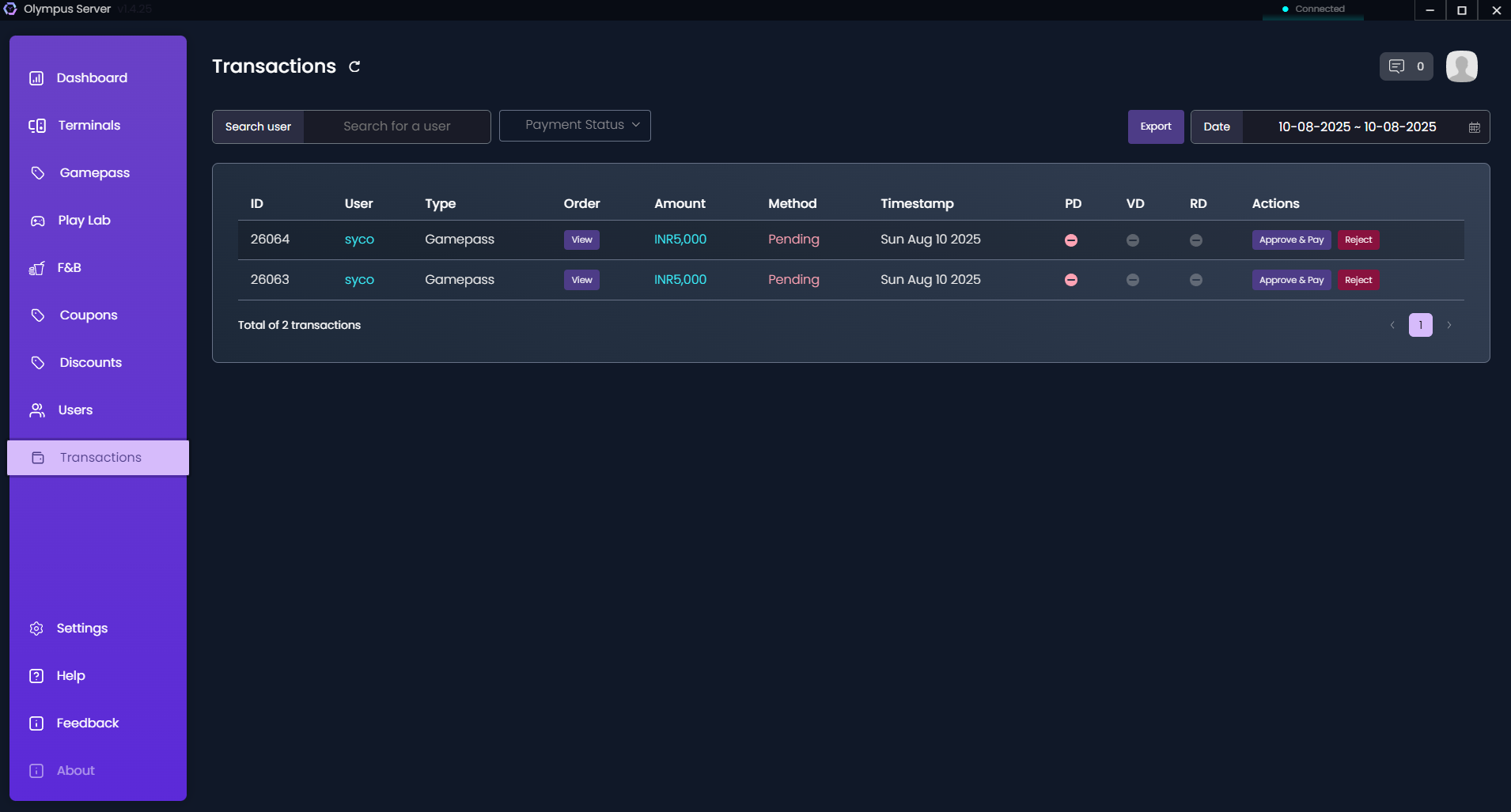
Transaction Overview
Every financial movement is recorded, including:
- GamePass purchases
- F&B sales
- Wallet recharges
- Play Lab rentals
- Refunds and adjustments
- Deposit collections
Viewing Transactions
Default View
The transaction list displays:
- Transaction ID: Unique reference number
- Date & Time: When the transaction occurred
- User: Customer name and ID
- Type: Category of transaction
- Description: Details of the purchase
- Amount: Transaction value
- Payment Method: How payment was received
- Status: Completed, Pending, or Failed
- Staff: Employee who processed the transaction
Filtering Options
By Date Range
- Today's transactions
- Yesterday's activity
- This week/month
- Custom date range
- Specific date selection
By Transaction Type
- Sales: All revenue transactions
- Recharges: Wallet top-ups
- Refunds: Money returned to customers
- Adjustments: Manual corrections
- Deposits: Security deposits collected
By Payment Method
- Cash
- Credit/Debit Card
- UPI/Digital Wallets
- Bank Transfer
- Wallet Balance
- Promotional Credits
By Status
- Completed: Successfully processed
- Pending: Awaiting confirmation
- Failed: Transaction unsuccessful
- Reversed: Refunded transactions
By User or Staff
- Search specific customer transactions
- Filter by staff member
- View walk-in customer sales
Transaction Details
Click any transaction to view:
Complete Information
- Full transaction breakdown
- Item-wise details
- Tax calculations
- Discount applications
- Payment reference numbers
Related Actions
- Print receipt
- Email invoice
- Process refund
- Add notes
- View user profile
Financial Reports
Daily Reports
Cash Register Summary:
- Opening balance
- Total cash received
- Total cash paid out
- Closing balance
- Denomination breakdown
Sales Summary:
- Total revenue
- Transaction count
- Average transaction value
- Payment method distribution
- Category-wise breakdown
Periodic Reports
Weekly/Monthly Analysis:
- Revenue trends
- Growth comparisons
- Peak business periods
- Popular services
- Payment preferences
Tax Reports:
- GST collection summary
- Tax liability calculation
- Input tax credit
- Filing-ready reports
Reconciliation Features
Daily Closing
- Count Physical Cash: Record actual cash in register
- System Calculation: Compare with system records
- Identify Discrepancies: Find any mismatches
- Document Reasons: Note explanation for differences
- Approve Closing: Supervisor verification
Bank Reconciliation
Match your records with bank statements:
- Import bank statements
- Auto-match transactions
- Flag discrepancies
- Track pending deposits
- Monitor settlement times
Refund Management
Processing Refunds
- Locate original transaction
- Click "Refund" button
- Select refund type:
- Full refund
- Partial refund
- Store credit
- Enter reason for refund
- Choose refund method
- Process with approval
Refund Policies
Configure automated rules:
- Time limits for refunds
- Approval requirements
- Refund methods allowed
- Documentation needed
Export & Integration
Export Options
Download transaction data as:
- Excel (.xlsx): For spreadsheet analysis
- CSV: For database import
- PDF: For printing and filing
- JSON: For API integration
Accounting Integration
Connect with accounting software:
- Tally export format
- QuickBooks compatibility
- Custom API endpoints
- Automated daily exports
Audit Trail
Transaction History
Every transaction maintains:
- Creation timestamp
- Modification history
- User actions log
- Status changes
- Note additions
Security Features
- Immutable Records: Transactions cannot be deleted
- Edit Tracking: All modifications logged
- Access Control: Role-based permissions
- Digital Signatures: For high-value transactions
Analytics Dashboard
Key Metrics
Revenue Analytics:
- Hourly revenue distribution
- Day-wise patterns
- Service-wise contribution
- Growth trends
Payment Analytics:
- Method preferences
- Transaction success rates
- Average processing time
- Failed transaction analysis
Customer Analytics:
- Spending patterns
- Frequency analysis
- Lifetime value
- Churn indicators
Best Practices
Daily Operations
- Regular Reconciliation: Close cash register daily
- Receipt Management: Always offer receipts
- Documentation: Note unusual transactions
- Backup Records: Regular data backups
Month-End Procedures
- Complete Reconciliation: Match all pending transactions
- Generate Reports: Prepare monthly summaries
- Tax Filing: Calculate tax obligations
- Archive Records: Store transaction backups
Fraud Prevention
- Dual Approval: For high-value transactions
- Regular Audits: Random transaction checks
- Access Logs: Monitor who accesses financial data
- Alert Systems: Unusual pattern notifications
Troubleshooting
Common Issues
Missing Transactions:
- Check filter settings
- Verify date range
- Review pending status
- Check user permissions
Reconciliation Mismatches:
- Review refunds processed
- Check manual adjustments
- Verify cash deposits
- Examine failed transactions
Report Discrepancies:
- Ensure correct date range
- Verify filter criteria
- Check timezone settings
- Review calculation methods