Play Lab: Managing Café Gadgets & Activities
The Play Lab feature enables you to track and bill time for non-PC equipment and activities in your café, such as gaming consoles, VR headsets, pool tables, or any other rentable equipment.
Understanding Play Lab
Play Lab extends your billing system beyond traditional PC terminals to encompass any time-based rental equipment or activity area in your establishment.
Common Use Cases:
- PlayStation/Xbox consoles
- VR headsets and stations
- Pool/billiards tables
- Board game areas
- Private gaming rooms
- Streaming/content creation booths
Adding Equipment
Step 1: Access Play Lab
Navigate to the Play Lab section from the main menu.
Step 2: Add New Equipment
Click "Add New Play Tool" to register new equipment.
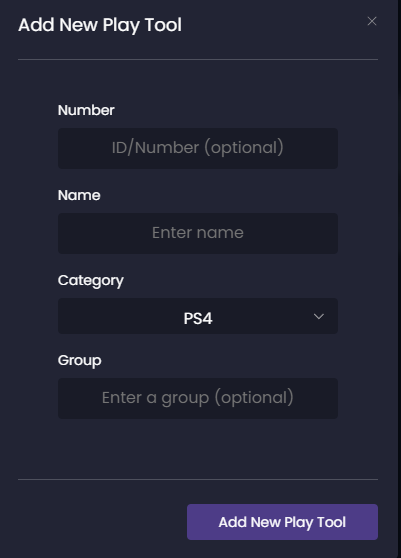
Configuration Fields:
Basic Information:
- Tool Name: Descriptive identifier (e.g., "PS5 Station 1", "VR Room A")
- Tool Type: Category of equipment (Console, VR, Table Game, etc.)
- Location: Physical location in your café
- Status: Active/Inactive/Maintenance
Pricing Configuration:
- Hourly Rate: Standard charge per hour
- Minimum Duration: Minimum billable time (e.g., 30 minutes)
- Advance Booking: Allow reservations
- Deposit Required: Security deposit amount (if applicable)
Managing Active Sessions
The Play Lab dashboard displays all equipment with real-time status:
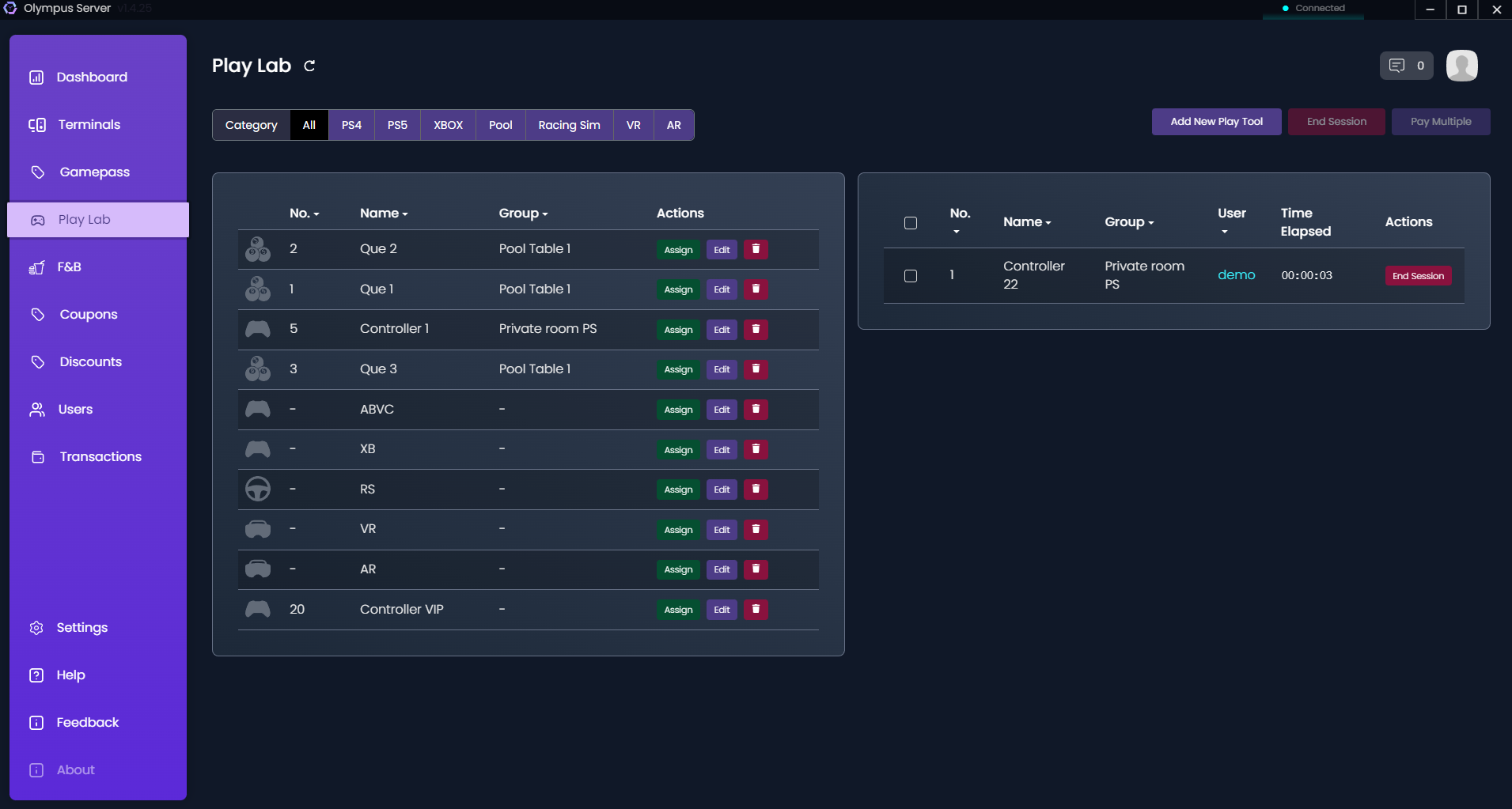
Status Indicators:
- Green (Available): Ready for use
- Blue (In Use): Currently occupied with timer running
- Yellow (Reserved): Upcoming booking
- Red (Maintenance): Temporarily unavailable
Starting a Session
- Select Equipment: Click on an available tool
- Assign to User: Search and select the customer
- Set Duration (Optional): Pre-set a time limit or leave open-ended
- Collect Deposit (If applicable): Record any security deposits
- Start Timer: Begin the billable session
The timer starts immediately and displays:
- Current user information
- Session start time
- Running duration
- Accumulated charges
Ending a Session
- Click "End Session" on the active tool
- Review charges: System calculates total based on actual time used
- Process payment: Accept payment through available methods
- Return deposit (If applicable): Record deposit return
Automatic Calculations:
- Rounds up to minimum billing increments
- Applies configured hourly rates
- Adds any additional charges (damage, late fees, etc.)
Advanced Features
Reservations
Enable advance bookings for popular equipment:
- Set booking time slots
- Require deposits for reservations
- Send reminder notifications
- Manage no-shows and cancellations
Maintenance Tracking
Log equipment maintenance:
- Schedule regular maintenance windows
- Track repair history
- Set automatic maintenance reminders
- Monitor equipment utilization rates
Package Deals
Create bundled offerings:
- Combine PC time with Play Lab equipment
- Offer group packages (e.g., "VR Party Package")
- Time-based promotions (e.g., "Happy Hour rates")
Reporting & Analytics
Track Play Lab performance:
- Utilization Reports: Equipment usage statistics
- Revenue Analysis: Income per equipment type
- Peak Hours: Identify busy periods
- Maintenance Costs: Track equipment ROI
Best Practices
Equipment Management
- Regular Maintenance: Schedule weekly equipment checks
- Clear Signage: Display rules and rates prominently
- Damage Policy: Establish clear policies for equipment damage
- Hygiene Protocol: Regular cleaning between sessions (especially for VR)
Pricing Strategies
- Peak Pricing: Higher rates during busy hours
- Package Deals: Encourage longer sessions with discounts
- Member Benefits: Special rates for regular customers
- Group Rates: Discounts for multiple equipment bookings
Customer Experience
- Quick Tutorials: Provide brief instructions for complex equipment
- Safety Briefing: Mandatory for VR and physical activities
- Assistance Available: Staff on standby for technical help
- Feedback Collection: Regular surveys on equipment satisfaction