GamePass: Billing Made Simple
Your complete gaming time billing system. Create packages, sell to customers, and track revenue effortlessly.
Quick Start
Most cafés start with 3 basic packages: 1 Hour (₹30), 3 Hours (₹80), Full Day (₹150)
💳 Selling GamePasses (2-minute process)
Quick Sale Steps:
- Find Customer → Search existing user or create new account
- Select Package → Choose appropriate GamePass type
- Payment → Cash, Card, UPI, or Wallet
- Done! → Customer can start gaming immediately
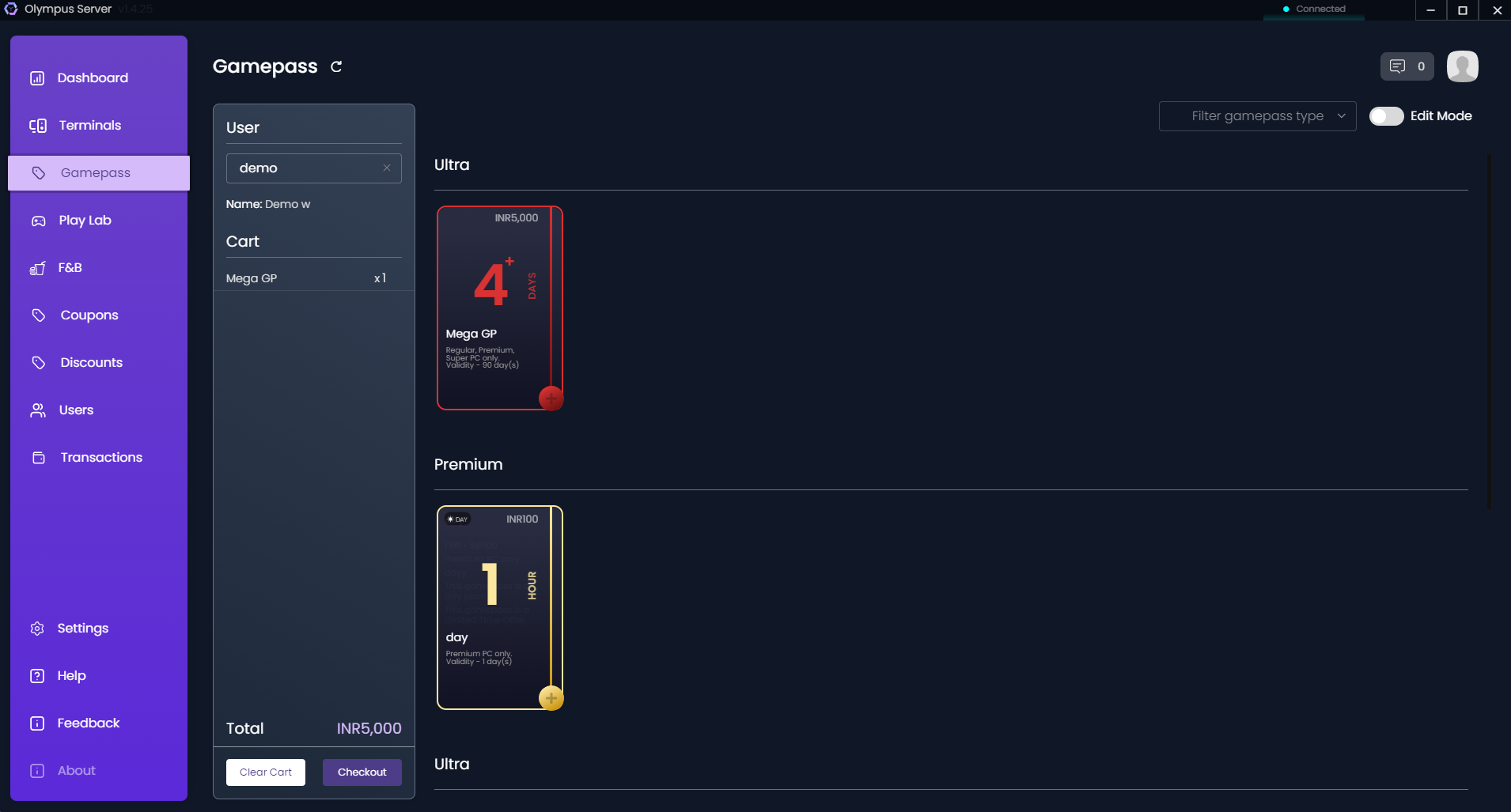
Payment Confirmation:

Auto-Features
- Receipt auto-generated (print or email)
- Balance added instantly to user account
- Session can start immediately
- All transactions logged automatically
Creating & Managing GamePasses
Accessing Management Mode
Toggle the "Edit" button to enter management mode. This reveals administrative controls for GamePass configuration.
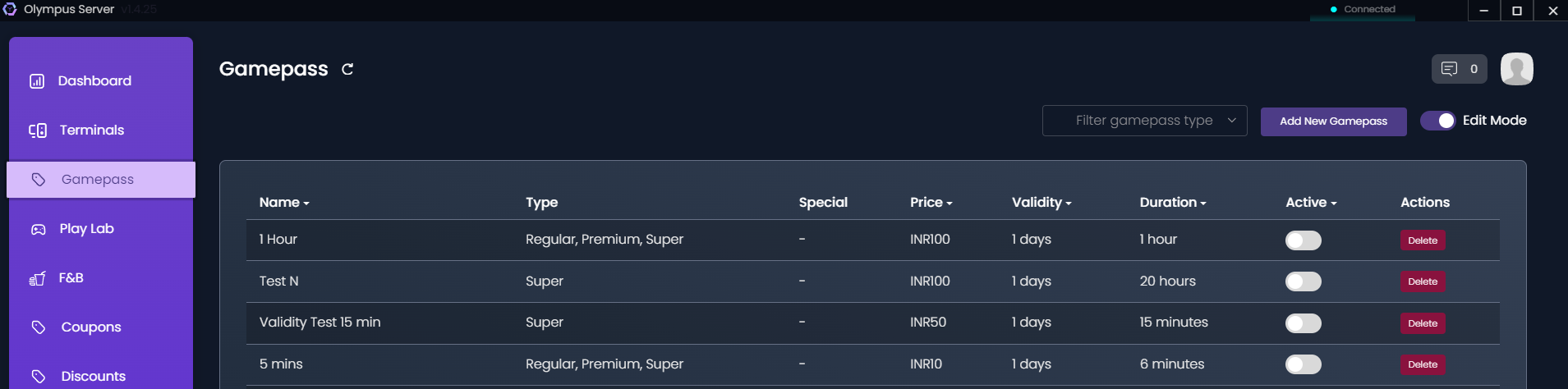
Management Table Features
The management interface displays:
- Pass Name: Identifier for each GamePass
- Duration: Time included (hours/days)
- Price: Cost of the package
- PC Type: Applicable terminal types
- Status: Active/Inactive
- Actions: Edit or Delete options
Creating a New GamePass
Click "Add New GamePass" to open the creation form.
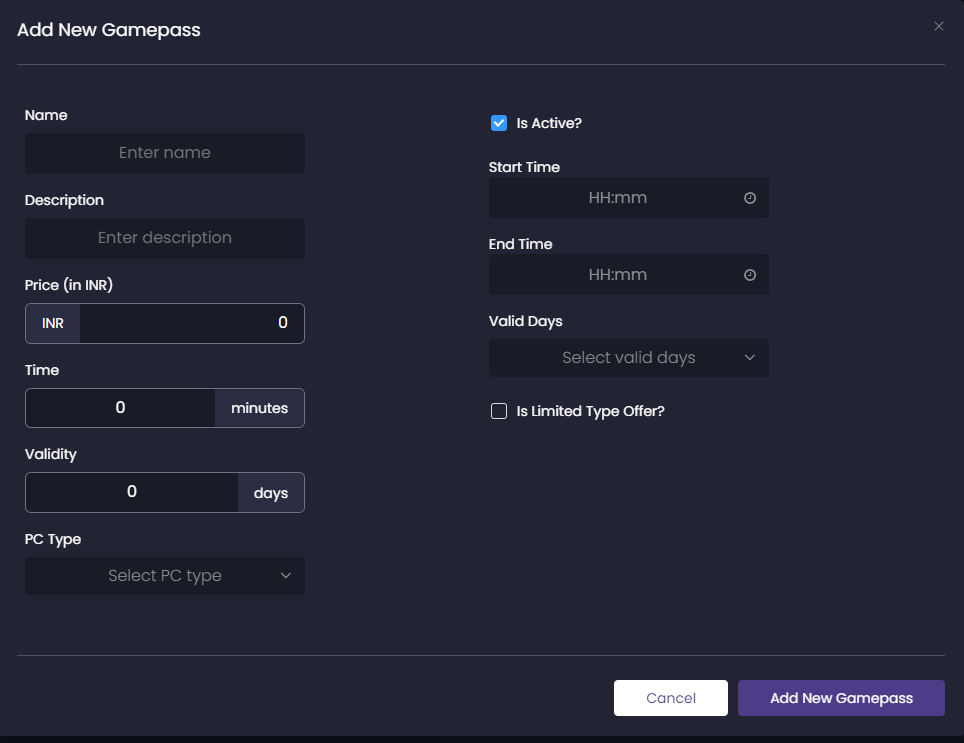
Configuration Options:
Basic Information:
- Pass Name: Descriptive name (e.g., "1 Hour Basic", "VIP Day Pass")
- Duration Type: Hours, Days, or Validity Period
- Duration Value: Numeric value for the duration
- Price: Cost in your local currency
Terminal Configuration:
- PC Type: Select applicable terminal types (Regular, Premium, Super)
- Multi-PC Access: Allow simultaneous logins
- Priority Access: Queue priority for premium passes
Advanced Settings:
- Validity Period: Expiration date for the pass
- Transferable: Allow users to transfer unused time
- Refundable: Enable refund options
- Peak Hour Restrictions: Limit usage during busy periods
Best Practices
Pricing Strategy
- Bulk Discounts: Offer better rates for longer durations
- Peak/Off-Peak: Different pricing for busy and quiet periods
- Membership Tiers: Create loyalty programs with special rates
Popular GamePass Types
- Hourly Passes: 1, 2, 3, 5 hours
- Day Passes: Full day, Half day
- Weekly/Monthly: Subscription-style passes
- Student Specials: Discounted rates with ID verification
- Night Packages: Late-night gaming sessions
- Tournament Passes: Special event pricing
Managing Existing GamePasses
Editing a GamePass
- Click the Edit icon next to the pass
- Modify desired fields
- Save changes (affects new purchases only)
Deactivating a GamePass
- Use the toggle switch to deactivate without deleting
- Deactivated passes remain in user accounts but can't be purchased
Deleting a GamePass
- Only delete if no active users have this pass
- Consider deactivating instead of deleting